packageR Features
This page lists packageR-specific behavior on top of upstream File Browser. It does not repeat normal File Browser features such as file browsing, users, uploads/downloads, text editing, basic shares, command hooks, branding, or standard media previews.
Object Storage Presigning
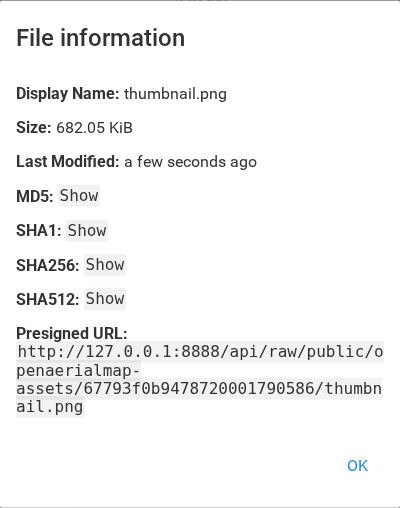
- Authenticated file requests and public share requests can return an
S3-compatible presigned URL with
?presign=true. In the UI, the file details screen can trigger the same flow when presigning is configured for the user. ?followRedirect=trueredirects to the presigned URL with HTTP 307, preserving the original GET or HEAD method.- Signing reads AWS-compatible settings from the user's stored environment map
and falls back to process environment values. Supported settings are
AWS_ACCESS_KEY_ID,AWS_SECRET_ACCESS_KEY,AWS_ENDPOINT_URL,AWS_REGION, and optionalBUCKET_NAME/BUCKET_PREFIX. - S3-compatible targets include AWS S3, MinIO, and Ceph RadosGW when they are exposed through the AWS endpoint and region settings above.
- The application still browses a mounted folder, usually the folder where the
object-storage bucket is mounted into the runtime. That folder can be
provided by a FUSE-based mount such as
s3fs, a Kubernetes CSI volume, or another platform storage integration.
Public Catalog and STAC
- Shares can store catalog metadata: catalog URL, filter field, and asset base
URL.
/api/public/catalog/<share>/<path>reads the configured Parquet catalog with DuckDB and returns STACFeatureorFeatureCollectionJSON. - By default, catalog files live inside the shared filesystem path. With
FB_ROOT=/workspace, sharing/a/basyyyuses/workspace/a/b/catalog.parquet, while/share/yyy/...remains only the public access URL. - Catalog rows are selected by matching asset hrefs under the requested package path. A configured filter field can narrow matching to one asset entry.
- Matching asset hrefs are rewritten to packageR public share URLs with
?presign&followRedirect. Public share preview links can point an external viewer at the catalog endpoint whencatalog.previewURLis configured.
Static Default Shares
FB_DEFAULT_SHARESlets the container bootstrap default shares at startup fromhash=path;hash=path. They are idempotent for the same owner, hash, and path, and existing catalog metadata is not overwritten.- Public share pages can show presigned URLs, optional preview URLs, and checksum values for shared files.
Preview and Type Handling
- File views request presigned metadata for files and use the presigned URL for
raw file access when it is available. TIFF and GeoTIFF files are detected as
a separate
tifftype and rendered in the browser with ageotiff.jscanvas renderer. - Parquet files are detected as a separate
parquettype. Current Parquet use is catalog/STAC querying; the frontend Parquet renderer is not implemented. - Zarr preview is not implemented in the current code.
User Defaults and Access Rules
- With generated user directories enabled, packageR creates
/home/<username>for each generated non-admin user and writes a.keepmarker there so the empty workspace is materialized on normal filesystems and object-store-backed mounts. - Generated users keep
/as their saved browsing scope, so they can still browse other permitted content belowFB_ROOT, including the full mounted bucket outside/home. Generated access rules hide sibling user homes, so users can browse bucket data but not/home/<other-user>. - Explicit legacy scope
.still creates/home/<username>and stores that generated directory as the user's scope, which keeps the user in home-only browsing mode. - Upstream File Browser deployments often rely on normal filesystem ownership and mode bits for this boundary; packageR adds explicit rules so the same sibling-home isolation works on bucket mounts where those Unix ownership assumptions may not hold.
- The generated rules are applied through CLI user creation, JSON signup, proxy-created users, hook-created users, quick setup, and admin API user creation. Existing custom user rules are kept after the generated rules, so normal rule precedence still applies.
Proxy Authentication Support
auth.mapper/FB_AUTH_MAPPERadds mapping for proxy-auth header values.- The mapper can use the raw header value, a value extracted from a JWT or base64 JSON header payload, or a static username.
- By default, claim parsing is unverified and assumes the request came through
a trusted authentication proxy. When
FB_AUTH_JWT_JWKS_URLandFB_AUTH_JWT_ISSUERare configured, JWT-valued proxy headers are validated against JWKS before the mapped claim is used as the username. - Proxy-created users are created only when signup is enabled and then receive the same defaults, environment map, home directory, and generated rules as other new users.
Container Bootstrap
- The packageR container runs an
init.shbootstrap before starting File Browser. - The bootstrap initializes or updates configuration from environment
variables, creates the admin user if needed, stores object-storage settings
for that user, and creates configured default shares.
FB_ALLOW_CHANGINGcontrols the default permissions applied by the bootstrap.